Recently, you may have noticed a growing wave of AI-generated videos appearing across platforms like Reddit, X, and YouTube. From cinematic mini-stories to stylized short clips, these videos are attracting millions of views and sparking curiosity about the technology behind them.
One of the main reasons for this surge is Seedance 2.0, an advanced AI video generation model released by ByteDance on February 10, 2026. Since its launch, the tool has quickly become a hot topic in the AI community and even caught the attention of creative professionals in the film industry.
Naturally, many users want to try Seedance 2.0 themselves to see whether it truly lives up to the hype.
However, during our research we discovered that many “free access” methods circulating online come with serious drawbacks. Some are unstable, others provide extremely limited features, and a few may even pose security risks.
To save you time and help you avoid unreliable solutions, we tested several of the most common access methods currently available. After filtering out the non-working or unsafe options, we’ve compiled the most practical and trustworthy ways to try Seedance 2.0 today.
What Is Seedance 2.0?
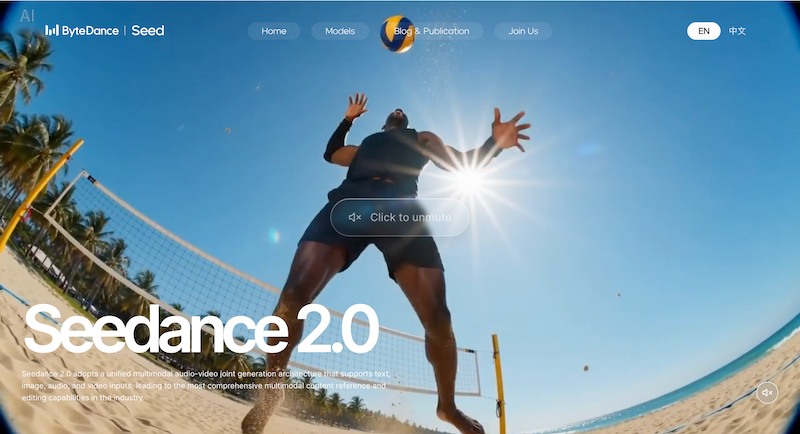
Seedance 2.0 is a next-generation AI video generation model developed by ByteDance. It allows users to create short videos using simple inputs such as images and text prompts.
In practice, the workflow is surprisingly simple. You upload a photo or reference image, write a short description of the scene you want to create, and the AI generates a short video within minutes. In many cases, the results feel surprisingly cinematic.
AI video models like Sora have already introduced similar capabilities. So what makes Seedance 2.0 stand out?
- Multi-Shot Video Generation
Many AI video tools can only generate a single isolated clip, which makes storytelling difficult.
Seedance 2.0 goes further by producing coherent multi-shot sequences from a single prompt. Characters, lighting, and visual style remain consistent across scenes, creating a smoother and more natural narrative flow.
- Accurate Lip Sync and Audio Alignment
Another impressive feature is its ability to automatically synchronize voice and lip movements.
Instead of manually editing audio or dubbing characters later, the AI aligns speech and facial motion during generation. This makes the final result much closer to a production-ready video.
- Stable Characters Across Scenes
Early AI video tools often struggled with character consistency. Faces could change between shots, or outfits might suddenly look different.
Seedance 2.0 significantly improves this issue. The system keeps characters stable across multiple scenes, even when the camera angle or movement changes. This is crucial for storytelling and makes the videos feel more believable.
Is Seedance 2.0 Free to Use?
Technically, Seedance 2.0 is not completely free. However, there are currently several ways to try it without paying.
Many platforms offer free credits for new users, allowing you to generate a limited number of videos before upgrading to a paid plan.
That said, you should be careful with websites claiming “unlimited free access.” These often come with poor performance, hidden limitations, or potential security issues.
To stay safe, it’s best to use official integrations or trusted platforms that provide legitimate free credits.
Method 1: Use Seedance 2.0 Through OpenArt (Best for International Users)
One of the easiest ways for international users to try Seedance 2.0 is through OpenArt AI.
Originally, Seedance was mainly available through Chinese platforms such as Jimeng and Xiaoyunque, which typically require a mainland China phone number (+86) for registration. This makes access difficult for users outside China.
OpenArt AI solves this problem by integrating multiple AI models, including Seedance 2.0, Seedance 1.5 Pro, Nano Banana Pro, Kling AI and more, into a single platform.
After signing up, you can start generating videos almost immediately—without complicated setup or technical configuration.
Most users receive around 40 free credits per month, which is usually enough to experiment with the model and test different creative ideas.
For beginners or anyone outside China, this is currently one of the most convenient ways to try Seedance 2.0.
Method 2: Use Seedance 2.0 Through the Doubao App (More Free Credits)
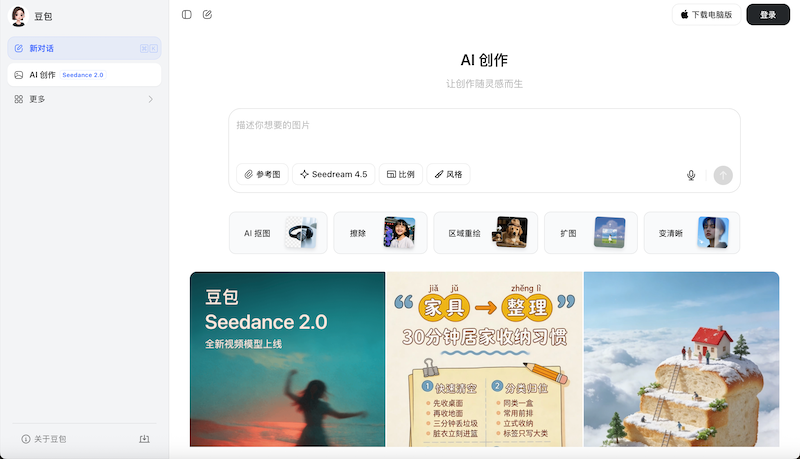
Another option is Doubao, an AI application also developed by ByteDance.
Doubao integrates Seedance 2.0 directly into the app and offers a relatively generous free quota. Users can typically generate around four videos per day, with each video lasting about 5–10 seconds.
However, there is an important limitation.
Creating an account usually requires a Chinese mainland phone number (+86), which can make it difficult for international users to register.
If you do have access to a Chinese phone number, Doubao can be one of the best ways to test Seedance 2.0 frequently without paying.
How to Use Seedance 2.0 (Step-by-Step Guide)
Once you gain access to a platform that supports Seedance 2.0, creating your first AI video is relatively straightforward.
Here’s a simple step-by-step overview.
Step 1: Access a Platform That Supports Seedance
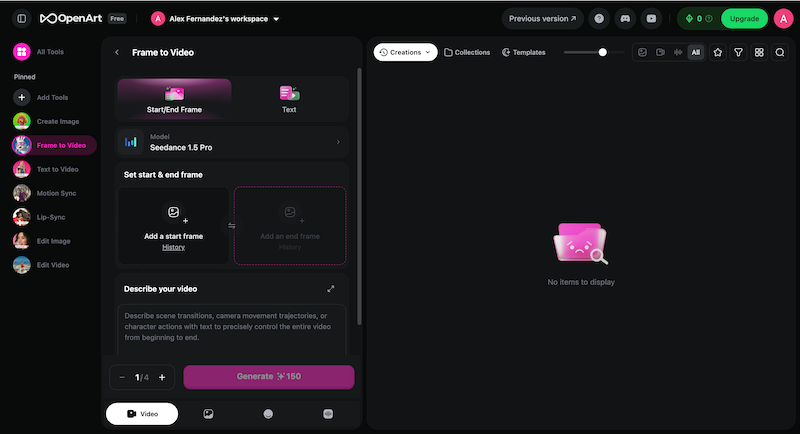
First, open a platform that integrates Seedance 2.0.
For most international users, OpenArt or other global platforms are the easiest starting point.
Step 2: Upload Reference Materials or Select Another AI Model
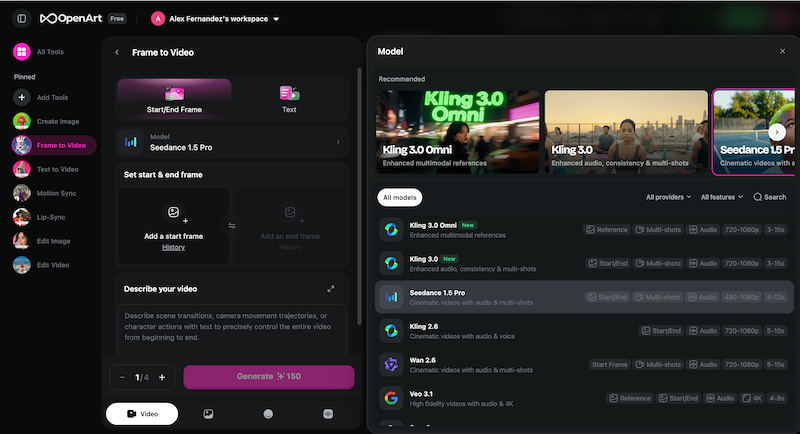
To achieve better results, you can upload reference images or other assets.
Examples include:
- Character images
- Scene backgrounds
- Action references
- Music or sound effects
The clearer and more specific your inputs are, the more consistent the final video will be.
Important: Seedance currently does not allow uploading real human portraits directly. If you want to appear in the video, you should first create an AI avatar version of yourself.
Step 3: Write a Clear Prompt
Your prompt plays a crucial role in the final result.
A simple structure that works well is:
Subject + Action + Scene + Camera Movement + Style + Quality Details
For example:
A young warrior walking through a futuristic city, cinematic lighting, slow camera movement, anime style, high detail.
Seedance also supports @tags that reference uploaded materials, giving you more precise control over the generated video.
Step 4: Adjust Generation Settings
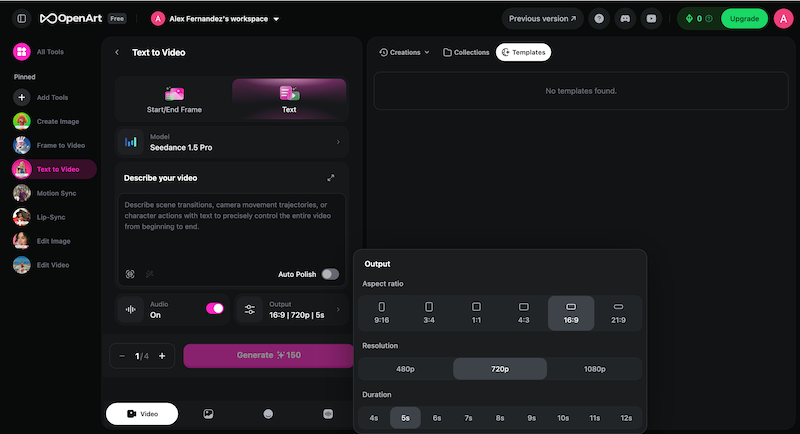
Before generating the video, you can customize several settings, including:
- Resolution (720p, 1080p, etc.)
- Video length (usually 5–10 seconds)
- Aspect ratio
Recommended formats include:
- 16:9 – Best for YouTube or horizontal videos
- 9:16 – Ideal for TikTok, Shorts, or Reels
- 1:1 – Suitable for social media posts
Choosing the right format helps optimize the video for your intended platform.
Step 5: Generate and Refine
Once everything is ready, click Generate.
The process typically takes 5–10 minutes depending on the platform and server load.
If the result isn’t perfect, don’t worry. You can improve it by:
- Refining your prompt
- Adjusting reference images
- Generating multiple variations
Some platforms also allow you to extend or continue a video, helping you build longer scenes from the original clip.
Conclusion
Seedance 2.0 is quickly becoming one of the most exciting AI video generation models of 2026. Its ability to produce coherent multi-shot videos, maintain stable characters, and synchronize speech makes it a powerful tool for creators.
While the model itself is not entirely free, there are several ways to test it without paying.
Platforms like OpenArt provide an easy entry point for international users, while apps like Doubao offer larger free quotas for users who can access Chinese services.
If you simply want the easiest and most accessible way to experiment, OpenArt is usually the best place to start.
As AI video technology continues to evolve, tools like Seedance 2.0 are likely to become an important part of content creation—from social media storytelling to full cinematic productions.