Home » AI Tools » AI Transcriber » Notta.ai
Notta.ai
Introduction: Notta.ai is an AI-powered transcription and note-taking platform that transforms spoken language from meetings, interviews, lectures, podcasts, and videos into accurate, searchable text.
What is Notta.ai?
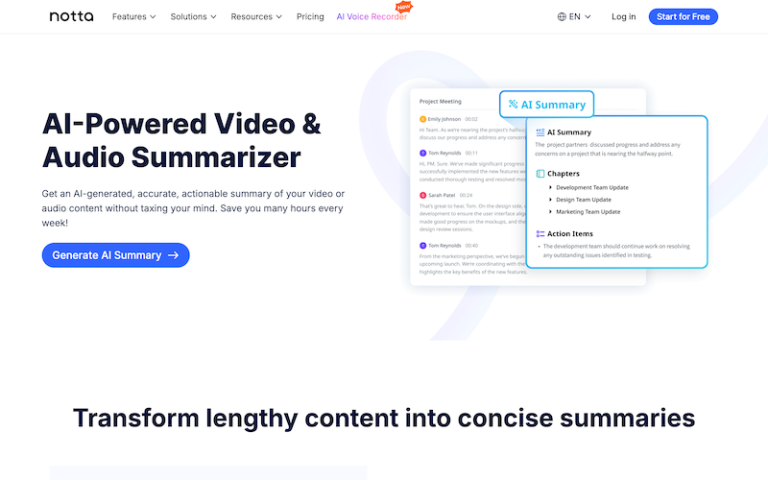
Notta.ai is an AI-powered transcription and note-taking platform that transforms spoken language from meetings, interviews, lectures, podcasts, and videos into accurate, searchable text. Beyond simple transcription, Notta adds real-time recordings, summaries, multi-speaker detection, translation, and integrations for professional workflows. It’s designed for teams, creators, students, and anyone needing high-quality speech-to-text output.
Main Features
AI Transcription (Real-Time + Upload)
- Convert spoken audio from uploaded files (MP3, WAV, MP4, MOV, etc.) into text.
- Record live conversations and meetings while automatically transcribing in real time.
Speaker Recognition
- Automatically detects and labels multiple speakers in a conversation — useful for interviews, meetings, and group sessions.
AI Notes & Summaries
- Notta can generate summaries, highlight key points, and extract actionable insights from long transcripts.
- You can choose summary templates (e.g., “focus on decisions” or “generate bullet takeaways”).
Multilingual Transcription & Translation
- Supports 50+ languages for transcription.
- Can translate transcripts into other languages for global audiences.
Interactive Editor
- Built-in editor to revise, annotate, highlight, search, and add tags within transcripts.
- Jump to specific moments in audio/video via timestamps.
Export & Sharing
- Export transcripts, summaries, and subtitles in formats like TXT, DOCX, PDF, SRT, VTT.
- Share transcripts as links with teammates or export into your workflow.
Integrations & Workflow Support
- Integrates with tools like Google Meet and Zoom for auto-capturing meetings.
- Offers API access and can connect with apps via Zapier.
Collaboration & Team Workspaces
- Create shared workspaces with collaborators for editing, commenting, and managing transcripts.
Pros and Cons
- Fast, accurate transcription for recorded files and live sessions.
- Multilingual support with translation capabilities makes it versatile.
- Speaker labels & summaries save time on manual note-taking.
- Export flexibility (text, subtitles, PDF, Word, etc.).
- Collaborative workspace features help teams work together.
- Real-time meeting capture useful for hybrid and remote work.
- Higher accuracy requires clear audio — noisy or low-quality recordings may mis-transcribe.
- Some advanced features (live transcription, translations, long transcripts) may be limited on free tiers.
- Summaries and translations may still need human review for nuance.
- Extensive usage can lead to higher billing if you exceed free or base quotas.